
CACTUSCLIENT
Free · 1.8.9 → 1.21.x · Windows, macOS, Linux

PvP, but
sharper.

CactusClient is a launcher and built-in client that gives you more FPS, snappier hit registration and 50+ mods - without touching a single setting.

Available for Windows, macOS and Linux · free forever

cactusclient — launcher
The CactusClient launcher home screen with profiles and a green Play button
+42% FPS
50+
built-in mods
1.8.9 → 1.21.x
with the client built in
+42%
average FPS gain
1 click
to full boost setup
Take a look inside

Built in. Not bolted on.

Scroll through the client the way you'd actually use it — in game, in the menu, and in the launcher.

The PvP HUD
In-game PvP with the CactusClient HUD: keystrokes, CPS counter, scoreboard and potion timers

01The PvP HUD

Keystrokes, CPS, potion timers, a movable scoreboard and your saturation bar - on screen the moment you join a game.

Every mod, one key
The CactusClient mod menu listing every module with toggles

02Every mod, one key

Right Shift opens the full menu. Click a row to toggle it, search by name, and every change applies instantly in game.

Drag-and-drop HUD editor
The drag-and-drop HUD editor with highlighted module boxes

03Drag-and-drop HUD editor

Snap every module to a 16-pixel grid, resize it, and lock it down. Your layout follows your profile.

A launcher that stays out of the way
The CactusClient launcher home with profile cards and a Play button

04A launcher that stays out of the way

Profiles for 1.8.9, modern versions and vanilla side by side. Java and memory are picked for you - just hit Play.

Yours from the title screen
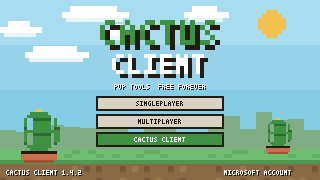
The CactusClient title screen with a pixel cactus logo and menu buttons

05Yours from the title screen

The client loads with every profile, so mods, accounts and your servers are one click from the title screen.

Capes for everyone. Free.
The CactusClient wardrobe with eight free capes and a character preview

06Capes for everyone. Free.

Eight pixel-art capes, all free, no shop and no paywall. Pick one in the wardrobe and every player sees it in game.

Why CactusClient

Everything a PvP player wants.
Nothing to configure.

One-click FPS boost
An FPS meter showing 247 average frames per second, up 42 percent

One-click FPS boost

Installs the right performance mods for your version - Sodium, Lithium and friends on modern, the tuned 1.8.9 stack on legacy - plus competitive video settings. Most players gain frames in the first minute.

  • +42% average FPS
  • Applies per profile
  • Undo any time
Built for low ping
A network graph holding a steady 12 millisecond ping

Built for low ping

Packets are sent the moment they're ready and network threads never wait behind rendering. Hit registration stays honest and the game never fights your OS for CPU time.

  • Faster netcode
  • Stable tick timing
  • No lag spikes
50+ built-in mods
The mod menu grid with modules like Keystrokes, CPS and Zoom toggled on

50+ built-in mods

Keystrokes, CPS, Armor Status, Potion Effects, Toggle Sprint, Zoom, Hitboxes, Motion Blur, Saturation, a movable Scoreboard and more. Right Shift in game opens the lot.

  • Zero config needed
  • Searchable menu
  • Per-profile layouts
A HUD you actually design
An in-game HUD with keystrokes, CPS and hearts laid out over a blocky world

A HUD you actually design

Every module is a draggable box on a pixel grid. Resize it, recolour it, lock it, and save it per profile - your 1.8.9 arena layout and your modern survival layout can differ.

  • 16px snap grid
  • Per-profile saves
  • Colour + scale controls
Friends, chat & one-click join
A friends list showing who is in game with Join and Invite buttons

Friends, chat & one-click join

Add friends by name, see who's online and which server they're on, then jump straight into their game. Party chat works from the launcher and from inside a match.

  • Online presence
  • Party chat
  • Join in one click
Fast installs, free capes
An install progress bar at 100 percent with game files reused and mods installed

Fast installs, free capes

Reuses the game files you already have and ships compressed Java, so a fresh profile is ready in seconds - and every player gets eight pixel-art capes at no cost.

  • Seconds, not minutes
  • 8 free capes
  • Reuses your files
50+ built-in mods

Right Shift opens everything.

Keystrokes, CPS, Armor Status, Potion Effects, Toggle Sprint, Zoom, Hitboxes, Motion Blur, Saturation, a movable Scoreboard and more — all included, all free.

FAQ

Questions, answered.

Is CactusClient really free?

Yes. The launcher, the client, every mod and every cape are free. There is no shop, no subscription and no paywalled feature.

Will it get me banned?

CactusClient has no cheats: no reach, no autoclicker, no x-ray, and combat is exactly vanilla. As with any client, check a server's rules for its allowed-mods list.

Which versions are supported?

The built-in client ships for 1.8.9 and modern releases up to 1.21.x. Every other version still runs in the launcher - just without the built-in client.

Can I use my own mods?

Yes. Drop any Fabric or Forge mod into a profile, or browse Modrinth from the launcher. CactusClient steps aside when another mod already does the same job.

Do I need a Microsoft account?

You need a Minecraft account to play online. Sign in with Microsoft inside the launcher; offline accounts work for singleplayer and offline servers.

Windows, macOS and Linux?

All three. macOS builds run natively on Intel and Apple Silicon, and Linux ships as an AppImage or .deb. Downloads always come from the latest official release.

Sharper PvP.
One download away.

Install takes under a minute. CactusClient keeps itself up to date and never asks for a penny.

Get CactusClient

Pick your platform.

Free to download. A Minecraft account is required to play.

Downloads come straight from our GitHub releases, so you always get the newest build.